DESK COCKPIT ENCLOSURE
The Kotori, meaning “little song bird of luck” is a small yet cost-effective flight simulator desk design packed full of diverse features and options. Primarily meant for home use, or for networking multiple units, this design is made to be able to roll up to it in an office chair. This unit can house one main display up to 32″ for instrumentation or even two side by side LCD displays from 20″ up to 24″. Additionally, it can house up to three 32″ displays for the main exterior views on the upper deck as shown in images, all on their stock stands and with or without out need of a VESA mounting system. All mounting options are detailed in the DIY builder manual.
DIY DK-1 Planset – $30
Using a 27″ display as shown allows the panel to be equipped with 5 bays for Saitek / Logitech Pro Flight equipment. Secondly, using a larger 32″ widescreen display for the instrument panel, the DK-1 can house nine (9) units of 6.5″ wide GoFlight avionics (2 bays on left, 7 bays at right). Therefore the design is made to accommodate equipment you may already own.
Both panel designs also include an iPad dock set at left for the ultimate in modern cockpit EFB (Electronic Flight Bag) integration. This can be flat mounted or via any bolt on articulating mount.
As shown in images, the horizontal space created below any 22″ to 27″ display will yield enough room for adding 1 or 2 mini LCDs and other panel switches if desired. Secondly, if you wish to use a 24″ main display instead of the 27″ or 32″, the yoke can be mounted more directly up under the panel for increased ergonomics.
Yes, we thought of everything with this small but fully functional package. All of these great features give you an immersive experience that is …as real as it gets!
Flexible options such as these allow you to experience your flight simulator software right out of the box using any common 3D “virtual cockpits” from software vendors such as AirManager as well all stock 2D pop-out type panels native to some aircraft within Microsoft Flight Simulator, or many available for Lockheed Martin’s Prepar3D. See our Equipment panel for gauge details.
SimSamurai offers “2D-VIP” panel sets for Prepar3D only via C+ and XML gauge programming. 2D panel sets for the new 2020/2024 Microsoft Flight Simulator are now installed via programs like AirManager.
Another unique feature for the DK series is the versatile and independent height adjustment options of both the main panel deck and the optional control yoke support deck armature. The main deck which the instrument panel sits on has three adjustment levels to accommodate monitors from 22″ using the highest level and lowest level setting for a 32″ display (the lowest level is shown in images). This serves to keep the dash height at or just below 42 which is the basic reference standard for most all aircraft and allows for a very realistic horizon line on the upper displays. This ergonomic feature is very important to reduce neck strain and to not be looking up as you fly, but instead helps to keep your eye-point straight ahead.
The optional flight control yoke support armature has 4 height adjustments plus a forward and back adjustment to fully tailor the yoke position to your liking much like you do in a car. When using a Saitek/Logitech or Honeycomb flight yoke, you can also use the flat top of the yoke to velcro mount any mini computer keyboard if desired.
Other final options include bolt on attachable decks for your computer mouse and or for using jet fighter style “HOTAS” flight stick and throttle combinations. Finally, the overhead portion of the DK-1 contains an optional upper shelf (8″ deep) to store items such as software and smaller books or manuals thus giving it an added feature of housing your most used flight training items.
Yes, we thought of everything! (didn’t we already say that lol?)
As pilots, we know how to make a simulator feel like the real thing. Most people never consider how bad typical home or office desks are for flight simulation ergonomics. If you’ve ever owned a sim setup on a standard desk you’ve probably noticed how you have to sit up really high to get a level eye view of the horizon line if using upper displays for the main visuals or you encounter the issue where it’s really hard to place the yoke in a truly comfortable, realistic position. We solve these issues by making all our design proportions based off real aircraft cockpits and then by massaging them just enough to not be quite as cramped as real aircraft are.
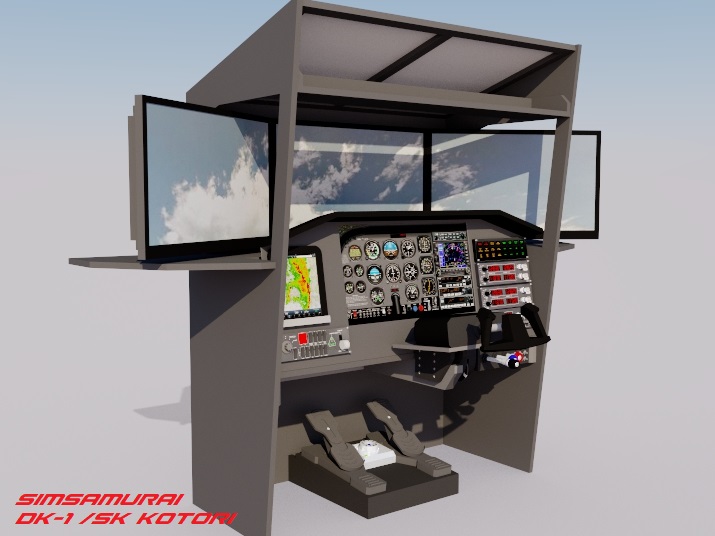
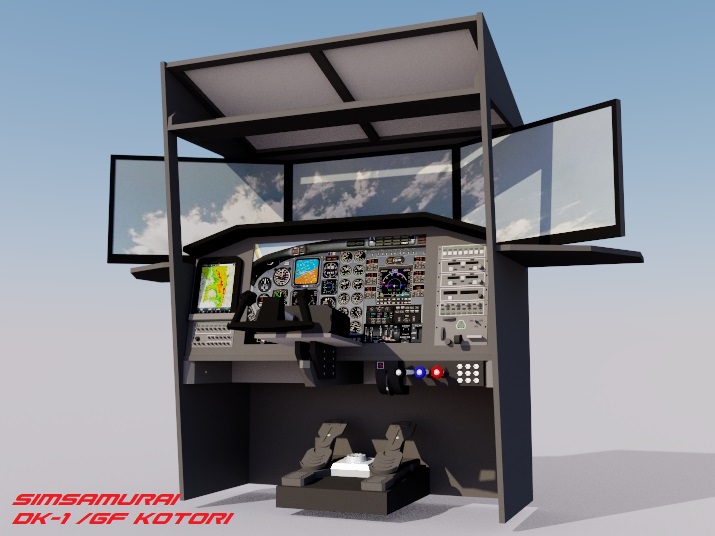
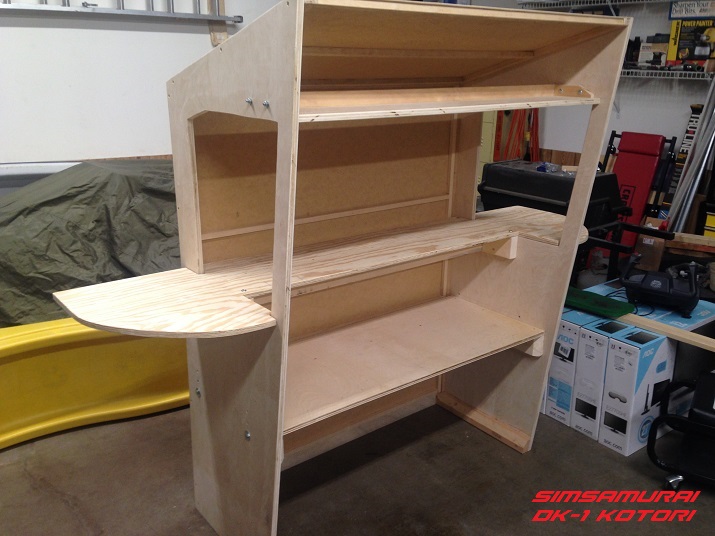
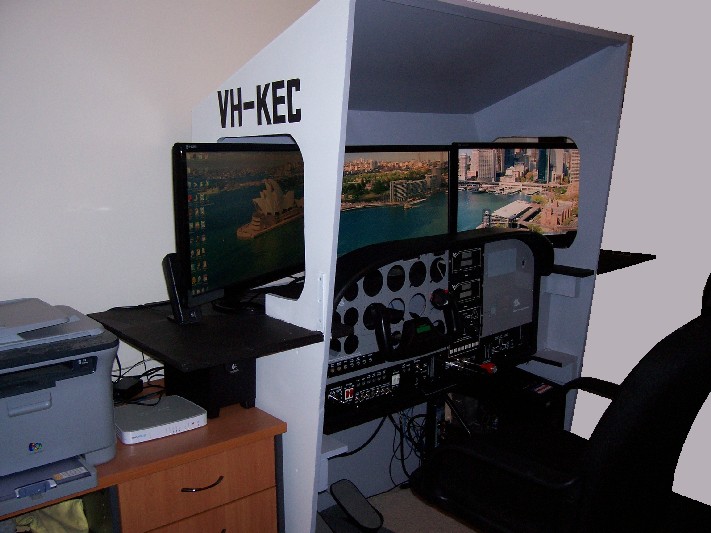
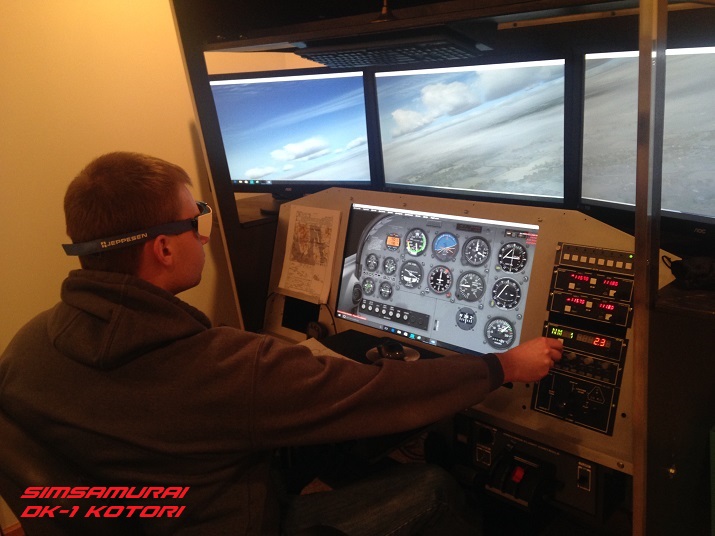
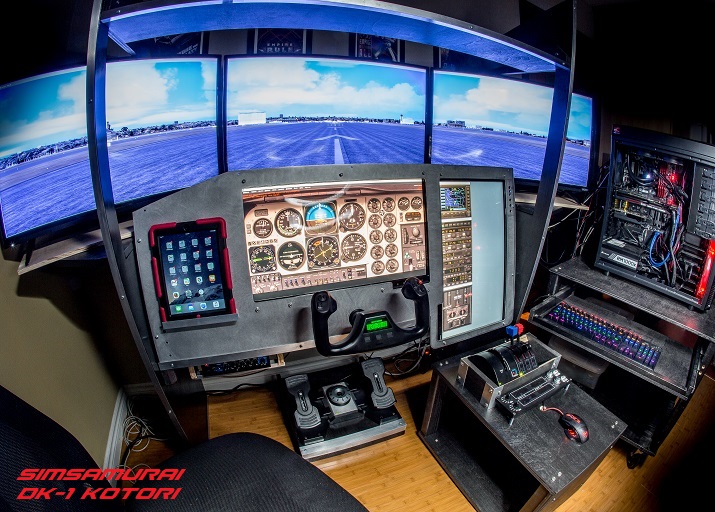
Our use of larger LCD screens for the main instrument panel such as 24″ or larger, allows a large amount of gauges to be displayed in true 1:1 scale as shown. This also allows for a much wider variety of aircraft to be flown, especially if you like big jets which ultimately have larger “glass gauges” that need to be in view such as the MCP or EICAS. By using 1 larger display, such as a 27″ or 32″, you also only use 1 output on your video card instead of two. Ultimately this can help with frame rates.
The other great feature of the Kotori’s desk based solution is it still allows you to use the cockpit for daily computer activities and other games too! But, if “ultimate tactile realism” is your thing, you can always install any realistic general aviation panel of your choice as shown in images as the interior width of the Kotori is as large as most general aviation twin engine aircraft (roughly 50″). In fact if ever desired, it could actually become a dual seat simulator at times when needed as the width dimensions are an average of most all common general aviation aircraft.
As with all our cockpit designs we can also custom design a CNC cut 6061 / .125″ aluminum instrument panel of your choice for the DK-1..just like a real aircraft. We can build it for you or we now offer DIY digital files for $100 so that you can have a panel set cut at a local fabricator of your choice to help you save money!
The DK-1 can easily be built in just two or three weekends, typically just one or two to build and one final weekend to paint. It’s a perfect design for people with limited construction experience who want a semi-enclosed simulator which can be crafted in little time with minimal materials cost (typically under $250) but still want something that will yield maximum results. In short, the DK-1 punches far above its weight class.
As a final feature if desired, the two vertical window support stanchions can also be permanently removed and replaced with interior support reinforcement bracing for a totally unimpeded view. However, we purposefully designed these into the DK1 we feel it adds to the experience as it helps simulate the front window stanchions in all aircraft.
DK-1 FEATURES & SPECIFICATIONS
Get Airborne!
- Ergonomic design based on real general aviation aircraft cockpit dimensions. You will feel “in the seat”.
- Designed to fit in any room in your home, dorm, office, or classroom setting and can be easily relocated.
- Ability to use up to 5 LCD displays (1 or 2 for flight instruments up to a single 27″ or 32″ and up to 3x 32″ for external views).
- Adjustable main deck for 22″ to 32″ LCDs
- Can be built using standard home construction tools.
- Can house GA sim panels from wide variety of vendors.
- Can house GA avionics sets from GoFlight or Saitek or others.
- Form follows function design maximizes materials use.
- Has several height adjustment features for all pilots.
- Adjustable yoke mounting armature.
- Easily Assembled / Disassembled
- Breaks down into 5 main sections.
- Completely modular sim design.
- Immersive sim environment.
- Needs floor space of ~75″ x 30″
- Can be built for $250 or less.
To purchase a DK-1 DIY Planset for $30, please send a purchase email inquiry to simsamurai@gmail.com.
Simply title the email as: DIY DK-1 Planset Purchase Request (copy/paste that into email title and message and include what you want).
Please include the email you use with PayPal (if different from the email you are sending the request from) and we will send you a PayPal payment invoice within 12-24 hours. Orders are typically processed and emailed out within 6-24 hours of confirmed payment. We process all orders in house.
Thanks for ordering!
Note: We also accept Venmo if desired.